
Digital annual pass
Plastic card no longer
mandatory
GaiaZOO is innovative when it comes to sustainability. Starting this year, it is finally possible for annual pass holders to be a Friend of Gaia without a physical card. You can show your subscription on your smartphone.
Do you have an active GaiaZOO membership? Then your digital pass is already available in your My GaiaZOO account! There are two ways to show your pass at the visitor entrance:
- In the brand-new GaiaAPP (easiest option – check out the app for Android and for iOS)
- In Mijn.GaiaZOO.nl (My GaiaZOO account, written in Dutch)
On this page, we explain how it works. And at the bottom of this page, we have compiled a number of frequently asked questions for you.

1. Digital pass in the GaiaAPP
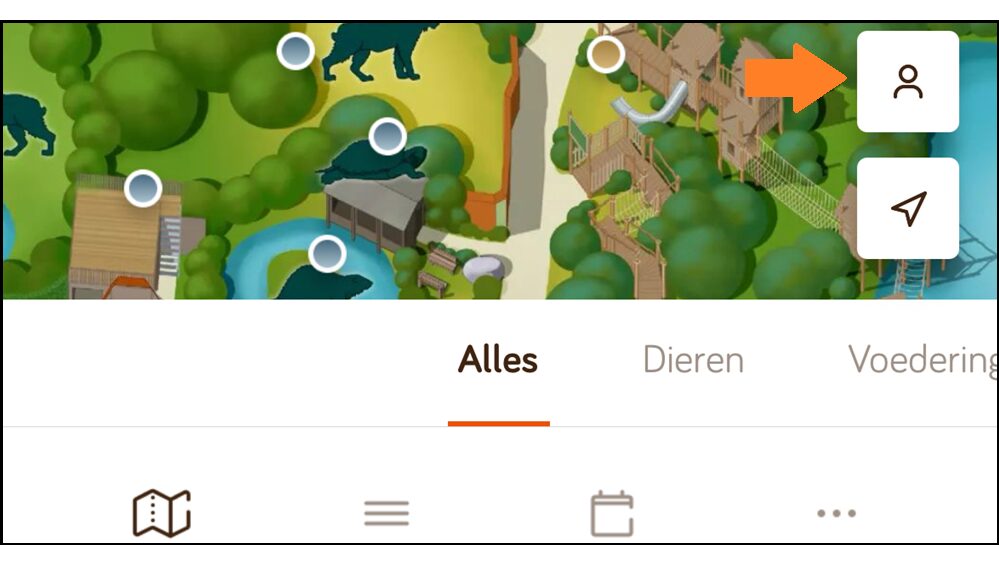
- Open the new GaiaAPP.
- Click on the person icon (bottom right of the screen).

- Log in with your My GaiaZOO account.
 Do you have an active GaiaZOO subscription, but no account on Mijn.GaiaZOO.nl yet? Then read the explanation at the bottom of this page about registering your account.
- After logging in, you will immediately see your digital pass(es). Show these at the GaiaZOO entrance.
 Do you have an active GaiaZOO subscription, but no account on Mijn.GaiaZOO.nl yet? Then read the explanation at the bottom of this page about registering your account.
2. Digital pass in My GaiaZOO
- Log in with your smartphone at Mijn.GaiaZOO.nl/login.
- You will immediately see your digital pass(es). Show this at the GaiaZOO entrance.
Photo remains mandatory
If you do not yet have a photo on your digital pass, you can have one taken at the service desk during your next visit. It is not possible to upload a photo yourself. A photo is still required.
Create My GaiaZOO account
- Open Mijn.GaiaZOO.nl/login
- To begin, enter your email address. Then click on “Ik heb nog geen account” (I do not have an account yet).
- Fill in all the information. Your membership number is particularly important, as we will link your account to it. You can find this number on your old card or in the order confirmation email.
- Once you have entered and saved all the information correctly, you will receive a confirmation email stating that you have successfully created your account. From now on, you can log in to Mijn.GaiaZOO.nl!
Switch to cardless not mandatory
We do understand if you would prefer to continue using your old member card; it will still be scannable at the entrance.
PDF version
If you do not have a My GaiaZOO account or do not want to use the new GaiaAPP, there is also a middle ground that allows you to be cardless. Our customer service team can send you a PDF file by e-mail or print it out for you. Please ask for this at the box office during your next visit.
- Please note: The PDF document shows the expiry date of your current active membership. Did you extend your membership further in advance? Then request a new PDF at the start of the new period, showing the new expiry date.
